How To Write Pinterest Descriptions & Titles for Traffic
Writing great Pinterest pin descriptions and titles is one of the main ways to successfully drive traffic to your content, products and services. The question is: What are the components of a good pin description, and how do you write them?

In the post below, I’ll be walking you through:
- Why pin descriptions and titles are so important for your Pinterest success
- Best practices to write pin descriptions and titles
- Step-by-step instructions you can refer to
- 3 more factors that impact a pin’s performance
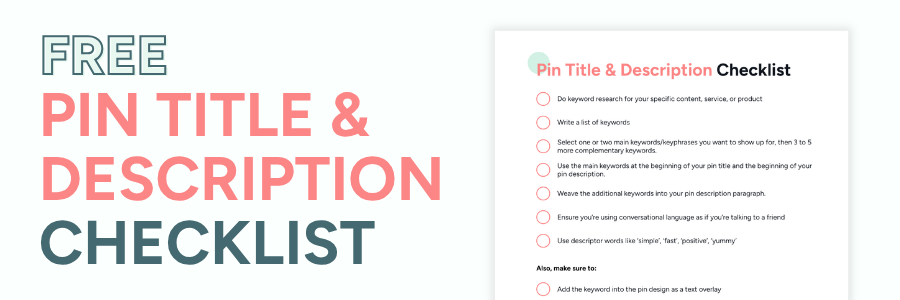
- Also, grab a free pin title and description checklist…
Let’s dive in.
Why Pinterest Pin Descriptions & Titles Are So Important

Pinterest descriptions and titles tell Pinterest exactly what your pin is about. This way, the Pinterest algorithm can serve your pin (and other related pins) to users when they search for content.
Then, when the Pinterest user comes across your pin, they will hopefully do the following:
- Click on the pin to see a larger version of it
- Save your pin to a relevant board
- Click on the link to your website or shop to read content and solutions or view a product
The goal: You want your pin to display in the search results for specific search terms
So, essentially, writing keyword-rich pin descriptions and titles is one of the most important things you can do to reach your business goals with Pinterest.
How To Write Pinterest Descriptions & Titles: Best Practices

These are the key components that go into writing a pin description and title that will help you drive more traffic.
First… Download the pin title & description best practices in a checklist…
1. Include Relevant Descriptive Keywords
To include relevant keywords, you must do some keyword research based on the content you want to drive your target audience to with your pin.
Pinterest is a search engine like Google, so SEO (search engine optimization) must be part of your Pinterest strategy to see results.
To start your keyword research, I recommend using…
Pinterest Search Bar ‘Auto-Fill’

The first place to look for relevant keywords to use in your pin titles and descriptions is by using the Pinterest search bar.
- Type in a broad topic, and the auto-fill box will show you the top terms people are searching for in relation to your topic.
- The results are in order of most used keywords, so take note of the related keywords at the top.
- Once you press enter, you’ll come to a search results page that has coloured keyword bubbles at the top…

Pinterest Trends Tool
A powerful tool on upcoming Pinterest trends that you can access inside of Pinterest under the Analytics dropdown.

You can search for specific keywords and see search volume over time, plus compare related keywords – helping you decide what KWs to use in your pins.
You can also see related keyword suggestions and popular related pins.
Tip: Review current trends across popular Pinterest categories, which is a great way to come up with new content ideas
Also, check out more ways to find the best keywords for your Pinterest title and description..
2. Write Based on User Intent
To understand user intent, ensure the keywords you are using in your title and description are directly related to the outcome/solution your content is providing.
3. Use Messaging That Ties to the Goal of Your Pin
There are different goals you want to achieve when creating pins. For example:
- Signing up for a free lead magnet
- Reading a post
- Affiliate sales
- Digital product sales
- etc
So, tell people what to do and what they can expect.
Examples:
Lead Magnet: If you’re creating a pin for a printable wedding checklist (as your lead magnet), add keywords in your description/title related to ‘printable checklist’ and ‘free printable checklist’. This will help you get in front of more people than just writing ‘wedding checklist’.
Affiliate Sales: Let’s say you have a Mother’s Day gift guide you’re creating a pin for. Other than targeting ‘Mother’s Day Gift Ideas’, you can also add in keywords that people are using when planning to shop, i.e. best, cheap, buy, Amazon, etc.
Also, make sure your call to action aligns with the goal of the content i.e., ‘sign up for the free wedding checklist now,’ or ’25 Best Mother’s Day Gifts To Buy on Amazon.’
4. Detail What the Person Can Expect When Clicking
Include some info on what they can expect when they click over to the content.
For example: ‘You’ll find step-by-step instructions on setting up a WordPress blog plus a free cheat sheet.’
5. Write in Full Sentences – No Keyword Stuffing
People read pin titles and descriptions to see if the pin relates to what they’re looking for, so write with proper sentence structure and do not copy and paste a ton of keywords (keyword stuffing).
6. Use a Call to Action
Add a call to action at the end of all of your pin descriptions, telling people what you want them to do.
Here are some examples:
- Download the free printable
- Sign up for your meal planning template
- See the full list of ideas
- Join the 30 day challenge
- Click to access all 100 journal prompts
Steps to Write Your Pinterest Pin Description & Title
- Do keyword research for your specific content, service, or product
- Write a list of keywords
- Select one or two main keywords/keyphrases you want to show up for, then 3 to 5 more complementary keywords
- Use the main keywords at the beginning of your pin title and the beginning of your pin description (a 2025 Tailwind study reports that shows that viral Pins consistently place their primary keywords in the first 30-35 characters of their titles)
- Weave the additional keywords into your pin description paragraph
- Ensure you’re using conversational language as if you’re talking to a friend
- Use descriptor words like ‘simple’, ‘fast’, ‘positive’, ‘yummy’
Also, make sure to…
- Add the keyword into the pin design as a text overlay
- Add related tagged topics as another ranking factor to tell Pinterest what your pin is about
- Add alt text to the pin – which is another way for Pinterest to learn what your pin is about and how to categorize it. Alt text is needed for accessibility, helping users with screen readers to understand the pin content.

Note:
- Pin descriptions can be up to 500 characters
- Pin titles can be up to 100 characters, but it’s a best practice to keep the title on the shorter side so it shows on a mobile device – stick with 30 to 60 characters
Pin Title Tip: Test different types of pin titles, such as using a number vs not using a number, or asking a question.
3 Other Factors that Impact a Pin’s Performance:
1. Create Good-Quality Pin Designs
Pinterest is a visual platform and people want to save visually appealing, good-quality pins to their boards.
Therefore, creating beautiful pins that also convert is just as important as having a strong pin title and description.
This ensures that when people are scrolling on their home feed or looking in the search results, your pin will stand out, so they stop scrolling and click on the pin to save and/or click through to your content.
👉 If you don’t love designing pins or you just want to save time, check out the pin templates in my shop that you can easily edit in Canva.
2. Save Your Pin to Related Boards that use the Right Keywords
Since Pinterest is a search engine, it’s also important that you use the right keywords on your Pinterest descriptions and board titles.
Follow the same keyword research process above and check out this article on how to create Pinterest board names and descriptions.
3. Create Content that Pinterest Users Want & Are Seeking
Just because you follow all of the Pinterest SEO best practices doesn’t mean you’ll see success.
The other main thing to focus on is creating relevant content as a blog post that Pinterest users are actively searching for.
Also, Pinterest users are moving quickly. They want to find answers, do research and find inspiration, so having an optimized blog post you drive your pin traffic to is important.
If you have a Podcast:
This means embedding the podcast episode into the blog post alongside a high-level overview of the episode, or ideally a written post about the episode.
This way, Pinterest users can find what they’re looking for, and then if they choose to listen to the episode too, even better.
For YouTube Videos:
Also embed the YouTube video into a blog post with a written article including actionable tips and solutions.
Combining written content and multimedia does a few important things:
- Attracts different types of people based on how they like to consume content
- Increases time spent and engagement on your website – especially with video content
- Provides the content creator with more opportunities to promote important lead magnets and products/services in the blog post
- Connects the podcast listener/YouTube viewer with more info so they can take action more easily
Final Thoughts & Next Steps:
I hope you found this guide useful to help get your pins and content in front of the right people on Pinterest.
As mentioned, Pinterest is a visual search engine and behaves very differently from typical social media platforms.
Pinterest stands apart as the platform is built to drive traffic to your content, products, and services, and this all stems from the average Pinterest user’s intent.
Pinterest users do scroll for inspiration, but also use Pinterest to help them take action towards goals, planning and future purchases.
This is why using the above best practices to write Pinterest descriptions and titles is so important. This enables you to get in front of your ideal audience when they are actively looking for what you offer.
Next Step: Download My Pin Title & Description Checklist
More Pinterest Resources:
- 14 Common Pinterest Mistakes That Prevent Business Growth
- The Best Pinterest Marketing Tools To Skyrocket Your Business
- Pinterest SEO Tips To Find the Best Keywords

About Yolanda
Marketing Consultant & Web Designer
I help online business owners & content creators drive more traffic, leads & sales to stop guessing and start seeing real results.
With 25 years of online marketing experience, I teach proven strategies, tactics & tools to help you set & achieve your goals, in a way you never imagined possible. Learn more!
