
5 Pro Strategies To Increase Website Traffic for Free
The most important way to grow your business is knowing how to increase traffic to your website for free, and that’s exactly what I’m going to break down for you in this article.

I’ll be covering the most effective ways to drive more website traffic without spending a dime.
This means I won’t be sharing every single way to drive traffic, but providing traffic-driving tactics that are proven time and time again. I don’t want to waste your time after all.
How To Increase Traffic To Your Website: 5 Best ROI Tactics

The marketing strategies I’ve highlighted below are in order of importance, but feel free to jump to each section below if you wish…
1. Create Original Content
One of the best ways to drive traffic to your website for free is by creating high-quality content you can promote.
When you drive your target audience and potential customers to this content, you can then promote:
- Lead magnets to get them on your email list
- Other related content
- Digital products
- Services
- Upcoming trainings and courses
Here are the steps to start on your content strategy…
1. Decide on the Type of Content
To get started with content creation, first decide what type of content you want to create:
- Written blog content
- YouTube video content
- Podcast
2. Determine Your Content Pillars
Next, think about the core content pillars you’d like to cover that are related to your blog or business.
Here are some examples:
- Life coach: Goal setting, personal growth, money, mindset
- Tea blog: iced teas, tea lattes, matcha tea, afternoon tea, tea sandwiches, tea accessories
- Wedding planner: Wedding tips, Honeymoons, Small weddings, Hair & Makeup
- Financial planner: Budgeting, Saving Money, Managing Money, Frugal Living
3. Brainstorm Content Ideas
Under each content pillar you’ve created, write as many content ideas as possible.
Come up with at least 10 ideas. If you have a hard time doing this, I would remove that content pillar (for now) and start working on the content categories that you do have a ton of ideas for.
How to find content ideas? Check out related accounts on Pinterest and Google and see what they write about.
Tip: Start by covering topics you:
- Have a lot of knowledge or expertise in
- Are deeply passionate about and want to learn more about
- You enjoy talking about and writing about
4. Write your Content (first Draft)
Select a topic from one of your content pillars and start writing.
Whether you’re creating a blog post, YouTube video, or podcast episode, you’ll need to write an outline and first draft of your content.
Note: If you’re creating podcast episodes or YouTube videos, I HIGHLY recommend creating a corresponding blog post where you embed the podcast episode or YouTube video.
This will help you generate more search traffic from Google (more details below), plus give you an additional place to promote your email list, products and services.
A tool I highly recommend to help with showing up in search is RankIQ, which gives you detailed reports showing a large number of keywords to add to your post, related competitor posts that are currently ranking on Google, a title analysis, number of words to write, etc.
5. Finalize & Publish Your Content
Finalizing your content consists of:
- Adding a featured image + other images to the blog post – make sure to use a plugin like Imagify to reduce image sizes
- Adding keywords within your content to help show up in search (more details below)
- Spellcheck and check for grammar
- Add internal links to related content
- Ensure your post is formatted properly
- Hit publish
Tip: Make sure you have a sharing plugin so people can share your content. I like the HubbubLite plugin (free), which is super easy to update the special share buttons you want to use.
2. SEO (Search Engine Optimization)
Search engine optimization is building your site and content in a way that makes it easier to show up in search results (Google, Bing, etc).
There are many things you can do to help your website get organic traffic from search engines, and they fall into these two categories:
- On-page SEO
- Off-Page SEO
On-Page SEO
When it comes to on-page SEO, one of the most important things you can do is keyword research and use specific keywords in various areas of a page or post.
These areas include:
- Blog Post title (H1)
- Other Headings (H2, H3, H4, etc)
- Body of your content
- Meta description – This is the description you set that can show up on the search results page
- Alt text – aka ‘alternate text’, which describes image content for the visually impaired
- Image file names
- Slug (url)
Note: In this age of AI, do not get ChatGPT or Claude to write your entire post. If you do, be sure that it will not show up on Google Search results. Instead, use AI as an assistant to help with ideas or writing an outline, but use your own words to prevent sounding like a robot with no emotion.
Where to do keyword research?
Doing keyword research does mean you’ll need to purchase a keyword tool. There are many expensive tools on the market, but these are the 2 I recommend that are very affordable:
1. Keywords Everywhere: This is a simple Chrome extension that shows you keyword data and search volumes right inside of Google as you search. This data helps you decide which keywords to target based on your content.
2. Ubersuggest: This is a more robust SEO tool that not only helps you find the right keywords but also learns what your competitors are ranking for, along with other powerful tools like SEO audits, backlink opportunities, technical fixes, and so much more. $29/month on an individual plan
Tip: Check out the search results on the page and look at your competitor’s domain authority (DA). DA represents the number of other sites that link to a website. The higher the DA, the easier it is to show up in search for specific keywords.
Due to this, take note of the DA’s of competitors, and if they are way higher than yours, it’ll be much harder to show up. So choose more niche keywords or another topic.
👉 You can check your DA (domain authority) with this free DA checker tool from Moz.
How do you increase your DA? This leads me to the other type of SEO…
Off-Page SEO
Off-page SEO is essentially growing your domain authority by building backlinks to your site.
You can do this by:
- Writing high-quality content – sites will automatically start linking to your website content over time
- Guest posting for reputable websites – sites typically link to your website within the body of the content or in your bio
- Being included in blogger round-up posts – very popular in the food blogger niche. You can find roundup opportunities by searching for roundup groups on Facebook.
- Be a guest on a podcast – and you’ll get brand mentions and backlinks from the show notes or corresponding blog content
- Being included in industry directories
- Write a review for a product and send the link to the company – many times, they’ll include a testimony on their website and link to the review
- Write press releases and submit to newswire services
When you grow your DA (domain authority), this represents positive signals to Google that your site can be trusted and that you have experience and authority within a given topic.
This is step 1 for on-page SEO; however, keep in mind that it’s also important to remember other high-priority on-page SEO tactics that affect user experience, like page load times and how easy it is to navigate a website.
Some of these additional SEO tactics include:
- Image size – aim to have images less than 100kb, or ideally 75kb (you can use a WordPress plugin like Imagify to automatically reduce file size when you upload images, which is great to save you time)
- Adding categories and sub-categories to content
- Having a navigation menu that reflects content categories plus other key pages on your website (about, services, contact, shop, etc)
- Internal linking to related content – you can hyperlink throughout a blog post
- External linking to trusted sources – this is especially important when referencing research
3. Pinterest Marketing
The reason Pinterest is at the top of my list is that it’s a top traffic driver for most bloggers and content creators (if they use it properly).
Why? Because Pinterest is a search engine (like Google), so people are intentionally searching and taking action.
These actions consist of saving your pins and clicking through to your website.
Pinterest has massive traffic opportunities for content creators.
To be successful with Pinterest, you’ll need to:
- Create great content that Pinterest users are actively searching for – I recommend using Pinterest Trends for content ideas
- Optimize your profile and boards using relevant keywords
- Do keyword research for each pin and include the keywords in your pin titles and descriptions
- Create scroll-stopping, high-quality pin images people save to relevant boards and click on – check out my shop for high-performing Canva pin templates
- Understand how Pinterest Analytics works so you can optimize your pins over time based on what’s working
👉 New to Pinterest? Here are some resources to get you started:
4. Email Marketing
The biggest mistake I made when starting both of my websites was not focusing on email marketing sooner.
Everyone had told me the importance of growing an engaged email list, but because I’d worked in corporate marketing for so long and wasn’t a fan of email marketing, I ignored everyone.
So don’t follow in my footsteps, because your email list is one of the most valuable assets of your business.
Why?
- You OWN your list of email subscribers and don’t have to rely on ever-changing algorithms that don’t show your content to followers.
- Email subscribers are more loyal – they spend more time on your website and are way more likely to buy from you due to you showing up regularly in their inbox.
How to get set up with email marketing:
- Sign up for an email provider. My go-to is Mailerlite. Even after I left them to try Flodesk, I quickly came back due to the quality of their features and functionality.
- Create a lead magnet to get your ideal target audience on your list – check out this list of 50+ lead magnet ideas for inspiration.
- Set up a form to collect email addresses through your email provider.
- Set up an automated workflow to deliver your lead magnet automatically
- Add that form to your website – a landing page like this, add it to a related blog post, or both.
- Promote your lead magnet – on Pinterest, social media, your website homepage, website sidebar, etc
- Create an automated short welcome series welcoming them to your site, telling them about yourself and what they can expect from you
- Beginning emailing – once a week is ideal. Share new blog posts, thoughts on your industry, products you love, testimonials, anything about your business or content, etc.
✨ Need help setting up your email marketing? Contact me or book a free discovery call and we can chat about how I can help.
5. Social Media
Using social media platforms to promote your online presence is always important, but just note that social media typically does not drive nearly as much traffic as the above solutions.
This is why using social media, from a traffic-driving perspective, is #5 on the list.
To take advantage of using social media to drive traffic, I recommend setting up the following…
Post Consistently
To be successful on social media, whether it’s Instagram, Facebook or TikTok, is all about posting on a consistent basis.
To see real results, I recommend posting 5 to 7 days a week at a minimum.
Note: This is why I’m personally a bigger fan of the other marketing tactics above to drive traffic, as the return on time spent is much higher.
Next, you’ll need to set up…
Link in Bio Page (Recommended)
You do not need to pay for this. It can simply be built on your website. Below is an example from one of my other websites.
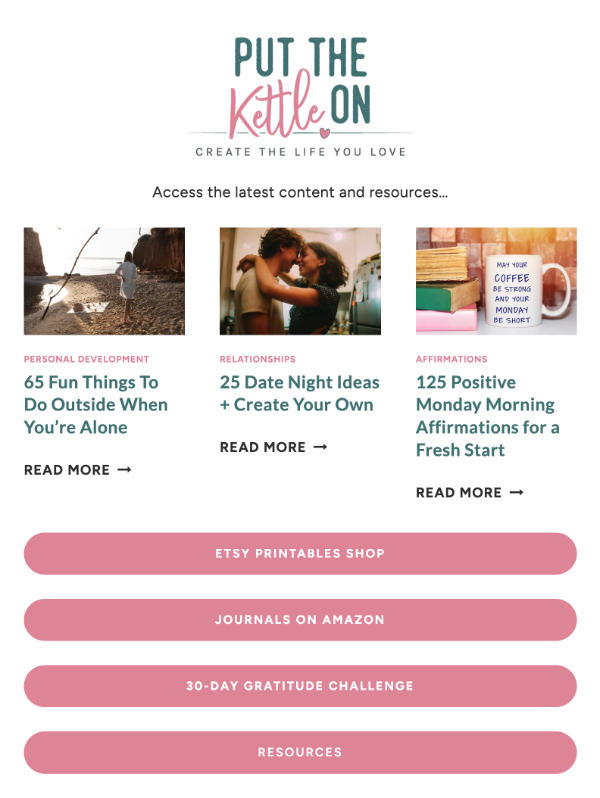
Many website themes have a links page included, and if not, they are easy to set up.
ManyChat (Optional, but recommended)
Most of you will know the feature ManyChat provides, even if you don’t know the name of the company! You know when people say, ‘comment ‘WORD’ in this post and I’ll send you ____’.
This is an automated feature and will send a link and info to your followers’ DM after they comment.
This is perfect to promote:
- Any content: blog post, YT video, latest podcast episode
- A lead magnet to get people on your email list
- A promotion (product, service)
- Link to book a call
Tip: If you need content ideas, refer to the content you’ve already created on your website and repurpose sections for different social media platforms.
Final Thoughts on Driving Website Traffic
There are obviously plenty of ways to drive traffic, however, the above strategies are what I recommend to help you drive significant, engaged traffic sooner and for prolonged periods of time.
As a first step, I recommend getting started on Pinterest right away, but before you do, just make sure there is a lot of content already on Pinterest for your niche/industry.
Pinterest can take a few months to really get going, but sticking with posting consistently (3 to 5 times a week to start is fine, if you can handle more – even better) will have a huge impact on your long-term traffic. I promise you won’t regret it!
I also recommend sticking with SEO best practices when publishing new content. And make sure to follow the best practices in this post: How to Format a Blog Post: 15 Best Practices.
✨ Need a hand with your marketing strategy? Get in touch or book a free discovery call to learn more!
More Online Marketing Resources:
- Pinterest Vs. Instagram: Which One for Your Business?
- 15 Ways To Promote Your Blog for Free
- 10 Pinterest Marketing Tools to Skyrocket Your Business
- 9 Types of Content Marketing to Grow Your Biz

About Yolanda
Marketing Consultant & Web Designer
I help online business owners & content creators drive more traffic, leads & sales to stop guessing and start seeing real results.
With 25 years of online marketing experience, I teach proven strategies, tactics & tools to help you set & achieve your goals, in a way you never imagined possible. Learn more!
